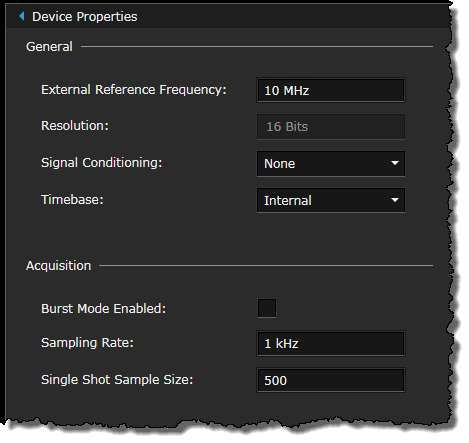
The following configuration settings are available in these panes.
Note: The specific features and functionality available in BenchVue will vary depending on the instrument and model number. Some of the parameters and functionality described here might not be available for your particular instrument. The bench application will show only those parameters, and parameter ranges, available for your particular instrument. Although the specific configuration properties vary by the DAQ model number, the primary elements of the bench application will be the same. In this case, the U2356A model is used as an example in the following description.
External Reference Frequency - Enter the desired value.
Resolution - The value displayed is dependent on the DAQ model used.
Signal Conditioning - The U2802A thermocouple input device option is only available for selection if you are using the U2355A or U2356A model. If you select U2802A, you can configure the thermocouple measurement settings under Advanced Settings in the Channel Config table for the selected channel(s). Select the Thermocouple measurement type and select the appropriate thermocouple type for the thermocouple connected to the device.
Note: The U2802A signal conditioning is only applicable for analog signals. When selected, the Digital IO tab will be hidden.
Timebase - Select the desired timebase source.
Burst Mode Enabled - Select this checkbox to enable the burst mode for data acquisition.
Sampling Rate - Enter the desired sampling rate. For optimum performance, you should set the sampling rate based on the number of channels you have selected by referring to the optimum sampling rate table in the User's Guide.
Single Shot Sample Size - Enter the number of acquisition points for the single shot acquisition mode.